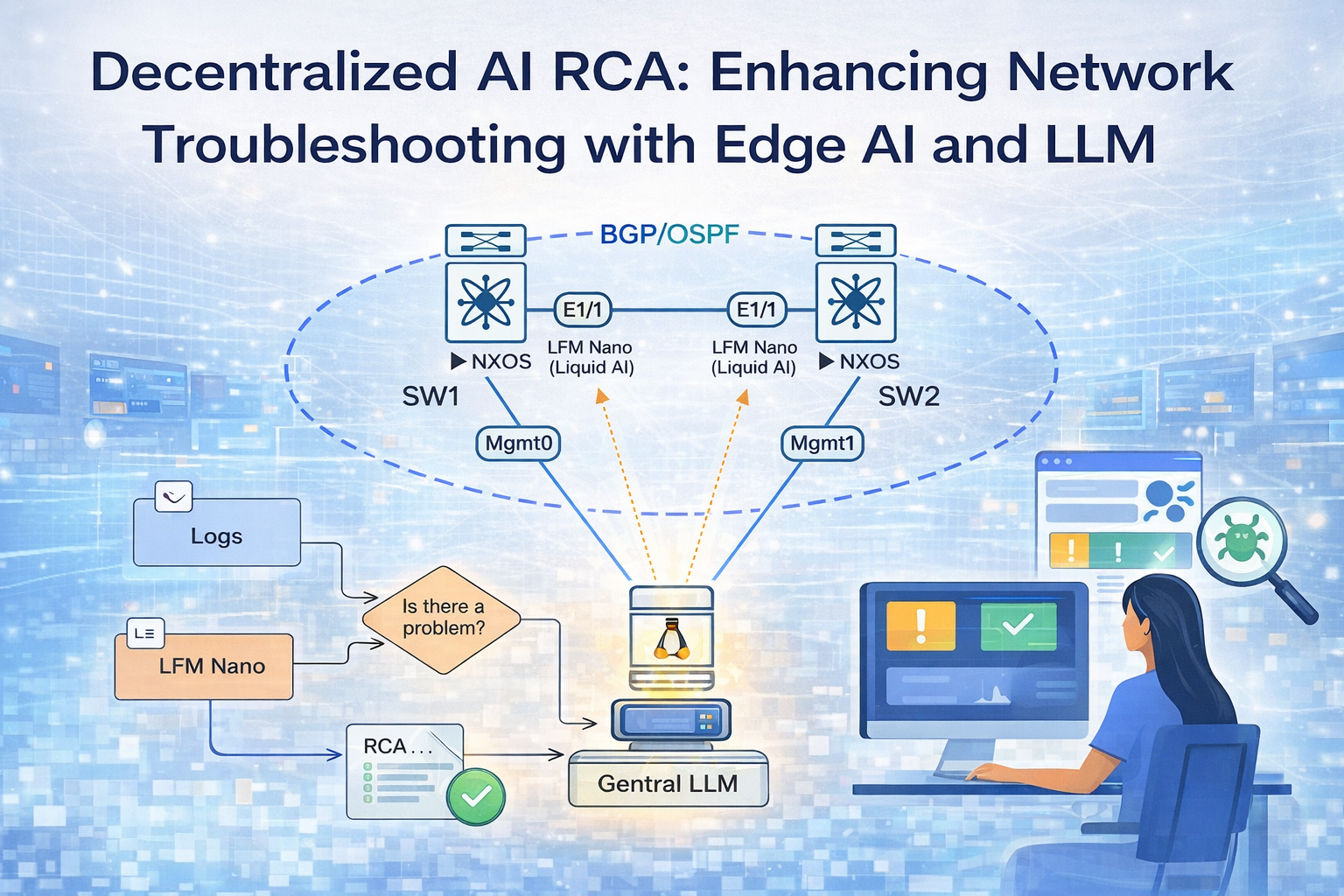
AI at the Edge: Decentralized Two-Tier Network Troubleshooting with Liquid AI LFM-Nano on Cisco NX-OS
Conventional network monitoring systems are good at detecting failure. They are considerably less good at explaining it. When a BGP session drops, an alert fires — but the alert tells you the effect, not the cause. The engineer still has to SSH in, pull syslog, check the route table, correlate timestamps across multiple devices, and reconstruct the failure sequence manually. In a complex network, that process can take anywhere from minutes to hours.
This post documents the design and implementation of a two-tier AI monitoring system built on Cisco NX-OS switches. The first AI tier is LFM-Nano — Liquid AI’s edge-optimized Liquid Foundation Model — running directly on each switch inside a Docker container, with no GPU and no cloud dependency. The second AI tier is a cloud LLM running on a central Ubuntu server, which correlates findings from all switches and produces a root cause analysis with remediation commands within 30 seconds of a failure. This build uses Gemini 2.5-flash, but the central agent is model-agnostic — GPT-4o, Claude, or any other capable cloud LLM works with minimal changes. A lightweight rule engine runs ahead of LFM-Nano on each switch to gate inference — the LLM is only invoked when a genuine problem is detected, keeping CPU usage on the switch hardware minimal.
The build covers everything from NX-OS feature configuration and Docker deployment on switch hardware, to the specific engineering choices that make this work on constrained network infrastructure: timestamp-aware log filtering, agent-side route table diffing to catch events NX-OS does not log natively, and a grace-period batching mechanism to ensure multi-switch correlation is complete before analysis runs.
This is not a theoretical architecture. Everything described here was built, tested, and verified on physical NX-OS hardware with real BGP and OSPF sessions.
Part 1 — Lab Topology and Prerequisites
The lab consists of two Cisco NX-OS switches connected over a point-to-point OSPF underlay, running eBGP between their loopback interfaces, with a Ubuntu server on the management network acting as the central AI aggregator. This topology is intentionally minimal — the same pattern scales directly to a production environment with more switches and a dedicated server.
What You Need
- Two Cisco NX-OS devices (physical or containerised — Nexus 9000v or 9300v works)
- One Ubuntu server with internet access (no GPU required) — we use 192.168.1.141
- Management network connectivity between all three devices
- Docker running on Ubuntu
- An API key for a cloud LLM — this build uses Gemini 2.5-flash (free tier at ai.google.dev); GPT-4o or Claude work equally well
Topology
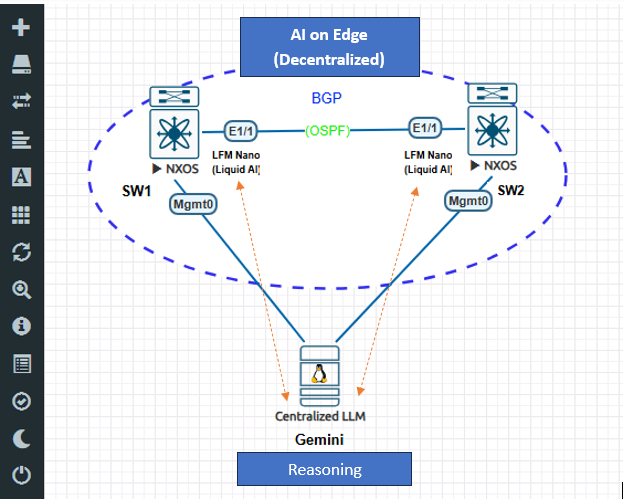
| Node | IP | Role | AI Component |
|---|---|---|---|
| SW1 | 192.168.1.50 | NX-OS switch, AS 65001 | LFM-Nano in Docker |
| SW2 | 192.168.1.51 | NX-OS switch, AS 65002 | LFM-Nano in Docker |
| Ubuntu | 192.168.1.141 | Central aggregator | Cloud LLM (Gemini 2.5-flash) |
Part 2 — System Architecture
The system has two AI tiers. Both run in Docker containers — one on the switch, one on Ubuntu.
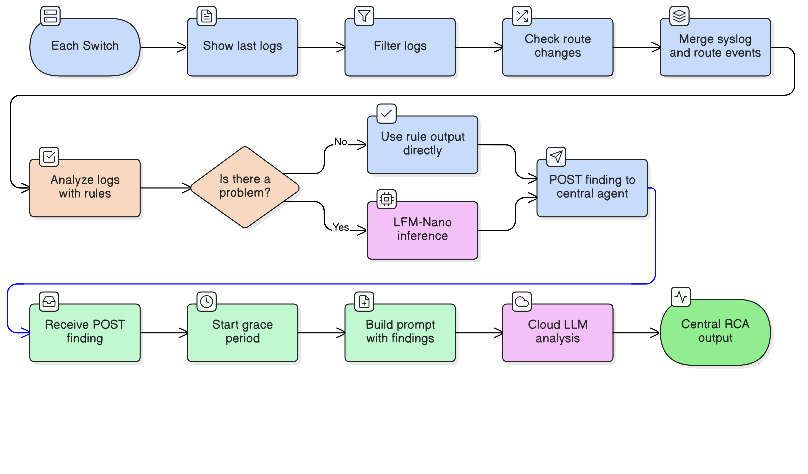
AI Tier 1 — LFM-Nano (Liquid AI): Each switch runs an agent that polls syslog and route table every 10 seconds. A lightweight rule engine classifies events first — BGP Down, OSPF adjacency loss, route change, interface failure. If a problem is detected, LFM-Nano is invoked. Liquid AI designed LFM-Nano specifically for edge deployment: it runs on 4 vCPUs with under 1 GB RAM, no GPU required, and has no dependency on external network connectivity. The switch can analyze its own failures even when all its uplinks are down. Findings are posted as structured JSON to the central agent.
AI Tier 2 — Cloud LLM: The central agent on Ubuntu receives findings from all switches within a correlation window. It waits 15 seconds after the first finding arrives to allow all affected switches to report before running analysis. The cloud LLM sees the full multi-switch picture simultaneously — something the local tier cannot provide — and produces a root cause analysis with the failure cascade and exact NX-OS remediation commands. This build uses Gemini 2.5-flash, but the agent is model-agnostic: switching to GPT-4o or Claude requires only changing the API client and key.
Part 3 — Preparing NX-OS
NX-OS follows a capability model where features are disabled by default and must be explicitly enabled. Before the AI agent can run, several platform capabilities need to be unlocked: NX-API for programmatic CLI access, bash-shell for running Docker commands from the NX-OS prompt, and the scheduler for ensuring the agent container restarts automatically after a reboot.
The routing configuration also needs one important addition: OSPF adjacency logging. Without it, an OSPF flap is invisible in syslog — you only see the downstream BGP failure, not the underlay event that caused it. Enabling this takes a single command and significantly improves the system’s ability to determine root cause.
Apply the following on both switches.
Step 1 — Enable Platform Features
feature nxapi
feature bash-shell
feature ospf
feature bgp
feature scheduler
nxapi— exposes a REST API on port 80/443; the agent uses this to pull syslog and route data without needing SSH inside the containerbash-shell— allows Docker commands to be run from the NX-OS CLI (run bash ...)scheduler— used later to auto-start the Docker daemon and agent container after reboot
Step 2 — Configure NX-API
nxapi http port 80
nxapi use-vrf management
We use HTTP on port 80 rather than HTTPS. The reason is practical: NX-OS self-signed TLS certificates expire periodically and require manual renewal. HTTP avoids that maintenance overhead without removing authentication — NX-API still enforces CSRF token validation on every request regardless of the transport.
Step 3 — Routing Configuration (SW1)
interface loopback0
  ip address 1.1.1.1/32

interface Ethernet1/1
  ip address 10.0.0.1/30
  no shutdown

router ospf 1
  router-id 1.1.1.1
  log-adjacency-changes detail
interface Ethernet1/1
  ip router ospf 1 area 0
interface loopback0
  ip router ospf 1 area 0

router bgp 65001
  router-id 1.1.1.1
  neighbor 2.2.2.2 remote-as 65002
  neighbor 2.2.2.2 update-source loopback0
  neighbor 2.2.2.2 ebgp-multihop 2
  address-family ipv4 unicast
    network 1.1.1.1/32
log-adjacency-changes detail on the OSPF process is the key addition. When the underlay fails, OSPF drops first — typically 3–5 seconds before BGP holdtimer expiry. With adjacency logging enabled, the syslog stream shows %OSPF-5-ADJCHG events that establish the failure sequence: underlay went down, then BGP followed. Without it, the agent only sees the BGP event with no indication of what caused it.
Step 4 — SW2 Mirror Configuration
Apply the same structure on SW2 with mirrored values:
- Loopback:
2.2.2.2/32 - Eth1/1:
10.0.0.2/30 - OSPF router-id:
2.2.2.2 - BGP AS:
65002, neighbor1.1.1.1remote-as65001
Step 5 — Verify Baseline
show ip ospf neighbors
Expect: Eth1/1 neighbor in FULL state.
show ip bgp summary
Expect: neighbor in Established state, PfxRcd = 1.
Step 6 — Save Configuration
copy running-config startup-config
Part 4 — Docker on NX-OS
NX-OS ships with Docker pre-installed, but the daemon does not start automatically. Starting it is straightforward:
run bash sudo service docker start
run bash sudo docker ps
Persistence After Reboot
The Docker daemon stops on every reboot, which means the agent container disappears. The solution is a startup script on bootflash combined with the NX-OS scheduler.
Create /bootflash/startup_fix.sh:
#!/bin/bash
# Remove stale PID file left over from unclean shutdown
rm -f /var/run/docker.pid

# Reload shared libraries required by NX-OS Docker
ldconfig /isan/lib /isan/lib64

# Start Docker daemon
sudo service docker start
sleep 5

# Restart agent container if it exists
sudo docker start nexus-ai-agent 2>/dev/null || true
Schedule it via NX-OS scheduler:
feature scheduler

scheduler job name STARTUP_FIX
  run bash bash /bootflash/startup_fix.sh

scheduler schedule name STARTUP_FIX_SCHED
  job name STARTUP_FIX
  time start now repeat 0:0:02
This runs every two minutes. It is idempotent — running it when Docker is already up has no effect.
Resource Constraints
NX-OS shares CPU and memory with the switch control plane. The agent container must coexist with FIB programming, OSPF hellos, BGP keepalives, and all the other processes that keep the switch running. In practice this means:
- No GPU available in any NX-OS platform
- Total container memory budget: roughly 1.5–2GB
- CPU threads available for inference: 4 vCPUs, shared
These constraints directly determine the model choice in the next section.
Part 5 — Model Selection
The model selection for this system is driven by two competing requirements. First-level analysis on the switch needs to be available even when the network is down — which is precisely when it matters most. That rules out any cloud-dependent model for the switch tier. The central agent, on the other hand, needs deep reasoning capability to correlate findings across multiple switches — something a small on-device model cannot reliably provide.
What makes the switch tier feasible is Liquid AI’s LFM architecture. Traditional approaches to edge AI involve taking a large model and compressing it — accepting degraded quality in exchange for size. LFM-Nano was built from the ground up for edge deployment: the Liquid Neural Network architecture achieves efficiency through structure, not through lossy compression of a larger model. The result is a model that is small enough to run on network switch hardware without a GPU, while remaining capable enough to classify network events accurately.
The solution is to split the work: LFM-Nano handles per-switch event classification directly on the device, while a cloud LLM handles multi-switch correlation from a server with internet access that is independent of the monitored network. The choice of cloud LLM is not fixed — this build uses Gemini 2.5-flash, but GPT-4o, Claude, or any model with a sufficient context window and strong reasoning capability will work.
LFM-Nano on the Switches — Edge AI by Design
Model: lfm-nano-q4.gguf — LFM-Nano by Liquid AI
LFM-Nano is a Liquid Foundation Model — a compact hybrid architecture that is neither a pure Transformer nor a pure Liquid Neural Network. It combines short gated convolution blocks, which handle the bulk of sequence processing efficiently, with a small number of grouped-query attention layers for reasoning. Liquid AI designed the LFM series specifically for deployment on resource-constrained edge hardware: the gated convolution layers avoid the quadratic memory cost of full self-attention, while the grouped-query attention layers preserve the reasoning capability needed for structured analysis.
This is what makes running an LLM on a network switch possible at all. A standard 1B parameter Transformer applies full self-attention across its entire context at every layer — expensive on CPU, memory-intensive, slow at the token count this hardware budget allows. LFM-Nano’s hybrid architecture replaces most of that attention overhead with gated convolutions, retaining only a few GQA layers. The result is meaningful inference on 4 vCPUs with under 1 GB RAM — the exact constraint envelope of Docker on NX-OS.
| Property | Value |
|---|---|
| Model family | Liquid Foundation Model (LFM) by Liquid AI |
| Parameters | 1 billion |
| Disk size | ~700 MB |
| RAM footprint | ~900 MB |
| Inference time | 10–25 seconds on 4 vCPUs |
| GPU required | No |
| Network required | No — fully offline |
A 7B transformer model would require 4–8 GB RAM and OOM-kill the switch OS. LFM-Nano fits comfortably within the NX-OS container budget while delivering classification quality sufficient for network event analysis.
Runtime configuration via llama-cpp-python:
from llama_cpp import Llama

llm = Llama(
    model_path=MODEL_PATH,
    n_ctx=512,       # syslog events are short; large context wastes memory
    n_batch=128,
    n_threads=4,     # match available vCPU count
    verbose=False
)
Cloud LLM on Ubuntu
Ubuntu has no GPU, which rules out local inference for anything larger than a few billion parameters. Any capable cloud LLM — Gemini, GPT-4o, Claude — can serve as the central reasoning tier. The requirement is straightforward: sufficient context window to hold findings from multiple switches, and strong instruction-following to produce structured root cause analysis with remediation commands.
This build uses Gemini 2.5-flash. It performs well on multi-device correlation prompts and has a free tier that is sufficient for lab use. The google-genai SDK is required (the older google.generativeai package is deprecated), and Gemini 2.x models require API version v1beta:
from google import genai

client = genai.Client(
    api_key=GEMINI_API_KEY,
    http_options={"api_version": "v1beta"}
)

response = client.models.generate_content(
    model="gemini-2.5-flash",
    contents=prompt
)
A free-tier API key from ai.google.dev is sufficient for this use case.
Part 6 — Switch Agent: decentralized_agent.py
The switch agent is a Python script that runs in a Docker container on each switch. Every 10 seconds it fetches syslog, filters it, checks for route changes, classifies events, optionally invokes LFM-Nano, and posts a finding to the central agent.
NX-API Authentication — CSRF
NX-API enforces anti-CSRF protection on every request, even over HTTP. Sending a POST without a valid session cookie and X-Csrf-Token header returns an HTTP 400 XML error: "Invalid request. Request is rejected." This is not documented prominently in the NX-API guide and causes silent failures when not handled correctly.
The solution is a two-step authentication flow:
Step 1 — Send a GET request to establish a session and capture the CSRF token from the response headers.
COOKIE_FILE = "/tmp/nxapi_cookies.txt"
HEADER_FILE = "/tmp/nxapi_headers.txt"
_csrf_token = None

def _refresh_csrf():
    global _csrf_token
    subprocess.check_output([
        "ip", "netns", "exec", "management",
        "curl", "-sk",
        "-c", COOKIE_FILE,
        "-D", HEADER_FILE,
        "-u", CREDENTIALS,
        "-o", "/dev/null",
        NXAPI_URL
    ], timeout=15)
    with open(HEADER_FILE) as f:
        for line in f:
            if line.lower().startswith("anticsrf:"):
                _csrf_token = line.split(":", 1)[1].strip()
                break
Step 2 — Use the cookie file and CSRF token on every subsequent POST.
def _nxapi(command):
    global _csrf_token
    if not _csrf_token:
        _refresh_csrf()

    payload = json.dumps({
        "ins_api": {
            "version": "1.0",
            "type": "cli_show_ascii",
            "chunk": "0",
            "sid": "1",
            "input": command,
            "output_format": "json"
        }
    })
    result = subprocess.check_output([
        "ip", "netns", "exec", "management",
        "curl", "-sk",
        "-b", COOKIE_FILE,
        "-H", f"X-Csrf-Token: {_csrf_token}",
        "-X", "POST",
        "-u", CREDENTIALS,
        "-H", "Content-Type: application/json",
        "-d", payload,
        NXAPI_URL
    ], timeout=15).decode()

    data = json.loads(result)
    out = data["ins_api"]["outputs"]["output"]
    return out.get("body") or out.get("clierror") or ""
The ip netns exec management prefix is necessary because the Docker container runs in its own network namespace, while NX-API listens in the management VRF namespace. Without crossing the namespace boundary, the HTTP request never reaches the NX-API listener.
Also note the cli_show_ascii type for the request. Using cli_show for commands like show logging returns structured JSON where NX-OS reports code 501 (no structured output) and puts the text in clierror rather than body. Using cli_show_ascii avoids this ambiguity and always returns plain text.
Timestamp-Aware Log Filtering
show logging last 20 returns the last 20 log lines by count, not by time. In a stable network, the most recent 20 lines may include events from several minutes ago mixed with events from a few seconds ago. When a BGP session that was up 15 minutes ago and went down 5 seconds ago both appear in the same log window, the LLM receives contradictory signals and produces unreliable output.
The fix is to parse the timestamp on every syslog line and discard events older than a configurable window (default: 120 seconds):
import datetime

TIME_WINDOW = int(os.environ.get("LOG_TIME_WINDOW", "120"))

def filter_logs(log_text):
    now = datetime.datetime.now()
    result = []
    for line in log_text.splitlines():
        if "%" not in line:
            continue
        if any(noise in line for noise in LOG_NOISE):
            continue
        # NX-OS syslog timestamp format: "2026 Mar 24 16:42:05"
        m = re.search(r'(\d{4} \w{3}\s+\d+\s+\d+:\d+:\d+)', line)
        if m:
            try:
                ts = datetime.datetime.strptime(m.group(1).strip(), "%Y %b %d %H:%M:%S")
                if (now - ts).total_seconds() > TIME_WINDOW:
                    continue  # stale event — drop it
            except ValueError:
                pass  # unparseable timestamp — include the line
        result.append(line)
    return "\n".join(result[-5:]) if result else ""
With this in place, the LLM only sees events that are causally relevant to the current moment — not a mixture of past and present state.
Agent-Side Route Table Diff
NX-OS generates no syslog entry when a static route is added or removed via the ip route command. This is significant because static route misconfiguration — particularly blackhole routes — is a common cause of silent BGP failures. The command logging level urib 5 was tested and confirmed to produce no output for static route changes; it only generates events for certain dynamic routing updates.
The solution is to have the agent poll show ip route every 15 seconds and diff the result against the previous snapshot:
_last_routes = None
_last_route_time = 0.0
ROUTE_POLL_EVERY = int(os.environ.get("ROUTE_POLL_EVERY", "15"))

def parse_routes(route_text):
    """Extract (prefix, via, proto) tuples from show ip route output."""
    routes = set()
    prefix = None
    SKIP_PROTO = {"direct", "local", "broadcast", "am"}
    for line in route_text.splitlines():
        m = re.match(r'\s*(\d+\.\d+\.\d+\.\d+/\d+)', line)
        if m:
            prefix = m.group(1)
        elif prefix:
            m = re.search(r'\*via\s+(\S+?)(?:,\s|\s)', line)
            if m:
                via = m.group(1).rstrip(',')
                tokens = [t.strip() for t in line.split(',') if t.strip()]
                proto = re.split(r'[-]', tokens[-1])[0].strip().lower()
                if proto not in SKIP_PROTO:
                    routes.add((prefix, via, proto))
    return routes

def check_route_changes():
    global _last_routes, _last_route_time
    if time.time() - _last_route_time < ROUTE_POLL_EVERY:
        return []
    _last_route_time = time.time()

    current = parse_routes(_nxapi("show ip route"))
    if _last_routes is None:
        _last_routes = current
        return []

    added   = current - _last_routes
    removed = _last_routes - current
    _last_routes = current

    ts = time.strftime("%Y %b %d %H:%M:%S")
    events = []
    for prefix, via, proto in sorted(added):
        events.append(
            f"{ts} {SWITCH_NAME} %ROUTE-CHANGE-5-ADDED: "
            f"prefix {prefix} via {via} protocol {proto} installed in RIB"
        )
    for prefix, via, proto in sorted(removed):
        events.append(
            f"{ts} {SWITCH_NAME} %ROUTE-CHANGE-5-REMOVED: "
            f"prefix {prefix} via {via} protocol {proto} removed from RIB"
        )
    return events
The synthetic log lines use the same format as real NX-OS syslog events and carry the current timestamp, so they pass through filter_logs() without modification. They are merged with the real syslog output before classification and inference:
route_events = check_route_changes()
if route_events:
    route_block = "\n".join(route_events)
    filtered = (route_block + "\n" + filtered).strip() if filtered else route_block
Rule-Based Classification and LLM Gating
Running the LLM on every polling cycle would be expensive — 10–25 seconds of inference per poll on hardware shared with the switch control plane. The solution is to run a fast, deterministic rule-based classifier first and only invoke the LLM when a genuine problem is detected.
Rule-based analysis:
def analyze_logs_rules(log_text):
    facts = []
    for line in log_text.splitlines():
        u = line.upper()
        if "ROUTE-CHANGE-5-ADDED" in u:
            m = re.search(r"prefix (\S+) via (\S+) protocol (\S+)", line, re.I)
            if m:
                facts.append(f"Route {m.group(1)} added via {m.group(2)} ({m.group(3)})")
        elif "ROUTE-CHANGE-5-REMOVED" in u:
            m = re.search(r"prefix (\S+)", line, re.I)
            if m:
                facts.append(f"Route {m.group(1)} removed from RIB")
        elif "BGP" in u and "DOWN" in u:
            facts.append("BGP neighbor Down")
        elif "OSPF" in u and ("DOWN" in u or "ADJCHG" in u):
            facts.append("OSPF adjacency lost")
        elif "IF_DOWN" in u or "LINEPROTO" in u:
            facts.append("Interface went down")
    return "; ".join(dict.fromkeys(facts))
LLM gating — the LLM is only invoked when the rule-based output contains a problem indicator:
PROBLEM_KEYWORDS = {"down", "null0", "removed", "expired", "went down", "lost"}

def is_problem(rule_output):
    return any(kw in rule_output.lower() for kw in PROBLEM_KEYWORDS)

# In the main polling loop:
rule_result = analyze_logs_rules(filtered)
if is_problem(rule_result):
    insight = analyze_logs_llm(filtered)   # invoke LFM-Nano
else:
    insight = rule_result                  # use rule output directly
BGP Up and OSPF Established events pass through as rule-based output. BGP Down, route changes, and interface failures trigger LLM inference.
Posting Findings to the Central Agent
Python’s requests library has socket-layer issues inside NX-OS Docker containers — connection attempts to addresses outside the container’s default namespace fail silently. The working solution is to use curl as a subprocess, which correctly resolves routing across network namespaces:
def post_finding(events, classes, timestamp, first_level):
    payload = json.dumps({
        "switch":      SWITCH_NAME,
        "time":        timestamp,
        "events":      events,
        "classes":     classes,
        "first_level": first_level
    })

    def _send():
        subprocess.run([
            "curl", "-s", "-X", "POST",
            "-H", "Content-Type: application/json",
            "-d", payload,
            "--connect-timeout", "5",
            "--max-time", "8",
            CENTRAL_AGENT_URL
        ], capture_output=True, timeout=10)

    threading.Thread(target=_send, daemon=True).start()
The POST runs in a daemon thread so the main polling loop is never blocked by network latency.
Part 7 — Building and Deploying the Switch Container
All development and container builds happen on Ubuntu. The switches load and run the pre-built image — they do not build it locally.
Project Structure on Ubuntu
/home/ubuntu/nexus-ai/
├── decentralized_agent.py     ← the agent script
├── Dockerfile
└── lfm-nano-q4.gguf           ← model file (~700 MB)
Dockerfile
FROM python:3.10-slim

RUN apt-get update && apt-get install -y \
    curl iproute2 gcc g++ cmake \
    && rm -rf /var/lib/apt/lists/*

RUN pip install --no-cache-dir \
    llama-cpp-python

WORKDIR /app

CMD ["python", "-u", "/app/data/decentralized_agent.py"]
The model file and the agent script are not baked into the image. Instead, both are volume-mounted from the switch’s bootflash at runtime. This keeps the container image at roughly 500 MB. Baking the 700 MB model into the image would produce a 1.2 GB artifact that takes significantly longer to transfer over the management network.
Build and Transfer
# Build on Ubuntu
cd /home/ubuntu/nexus-ai
docker build -t nexus-ai-agent:v2 .
docker save nexus-ai-agent:v2 | gzip > /tmp/nexus-ai-agent-v2.tar.gz

# SCP image and script to both switches
sshpass -p 'C1sco12345' scp /tmp/nexus-ai-agent-v2.tar.gz \
    admin@192.168.1.50:/bootflash/
sshpass -p 'C1sco12345' scp /home/ubuntu/nexus-ai/decentralized_agent.py \
    admin@192.168.1.50:/bootflash/

# Repeat for SW2 (192.168.1.51)
Load and Run on the Switch
run bash sudo docker load -i /bootflash/nexus-ai-agent-v2.tar.gz

run bash sudo docker run -d --name nexus-ai-agent \
  --privileged \
  -v /var/run/netns:/var/run/netns:ro \
  -v /bootflash:/app/data:ro \
  --restart unless-stopped \
  --log-opt max-size=10m --log-opt max-file=3 \
  -e SWITCH_NAME=SW1 \
  -e CENTRAL_AGENT_URL=http://192.168.1.141:8888/finding \
  nexus-ai-agent:v2 python -u /app/data/decentralized_agent.py
Key flags:
--privileged— required to executeip netns exec managementinside the container-v /var/run/netns:/var/run/netns:ro— exposes the host’s network namespace directory, allowing the container to cross into the management namespace-v /bootflash:/app/data:ro— mounts the model file and agent script without embedding them in the image
SW2 uses the same command with -e SWITCH_NAME=SW2.
Verify Startup
run bash sudo docker logs --tail 20 nexus-ai-agent
Expected output:
Model loaded. (lfm-nano-q4.gguf)
--- Nexus NRE Agent Live [SW1] — poll=10s window=120s route-diff=15s ---
CSRF session refreshed (token: a3f9bc12...)
Route table initialised: 6 entries
Part 8 — Central Agent: central_agent.py
The central agent is a Flask application running in Docker on Ubuntu. It receives structured findings from both switch agents, batches them with a configurable grace period, and passes the full batch to a cloud LLM for root cause analysis. The implementation uses Gemini 2.5-flash, but the LLM call is isolated to a single function — swapping in a different provider means replacing the API client, not rearchitecting the agent.
Grace Period Batching
When a network event affects multiple switches simultaneously — a physical link failure, a routing loop, an incorrectly applied access list — all affected switches will detect and report the event within a few seconds of each other. Without a batching mechanism, the correlator would fire as soon as the first finding arrives, before the other switches have had a chance to post.
The grace period addresses this. When the first finding arrives, a 15-second timer starts. Any additional findings that arrive within that window are added to the same batch. After the timer expires, the full batch goes to Gemini:
import threading, time
from flask import Flask, request, jsonify

app = Flask(__name__)
pending_findings = []
first_finding_time = None
_lock = threading.Lock()

GRACE_PERIOD       = int(os.environ.get("GRACE_PERIOD", "15"))
CORRELATION_WINDOW = int(os.environ.get("CORRELATION_WINDOW", "30"))

@app.route("/finding", methods=["POST"])
def receive_finding():
    global first_finding_time
    data = request.get_json(force=True)
    data["received_at"] = time.time()
    with _lock:
        pending_findings.append(data)
        if first_finding_time is None:
            first_finding_time = time.time()
    return jsonify({"status": "ok"}), 200

def correlation_loop():
    global first_finding_time
    while True:
        time.sleep(1)
        with _lock:
            if not pending_findings or first_finding_time is None:
                continue
            if time.time() - first_finding_time < GRACE_PERIOD:
                continue
            batch = list(pending_findings)
            pending_findings.clear()
            first_finding_time = None
        run_rca(batch)
Gemini RCA
def build_prompt(findings):
    lines = []
    for f in findings:
        lines.append(f"Switch: {f['switch']} | Time: {f['time']}")
        lines.append(f"Events detected: {', '.join(f.get('events', []))}")
        lines.append(f"First-level analysis: {f.get('first_level', 'N/A')}")
        lines.append("")
    context = "\n".join(lines)
    return (
        "You are a Senior Network Reliability Engineer. "
        "The following findings were reported by network switches within the same 30-second window. "
        "Identify the single root cause, explain the failure cascade in chronological order, "
        "and provide exact NX-OS CLI commands to remediate the issue.\n\n"
        f"FINDINGS:\n{context}\n\nROOT CAUSE ANALYSIS:"
    )

def run_rca(findings):
    prompt = build_prompt(findings)
    response = client.models.generate_content(
        model=GEMINI_MODEL,
        contents=prompt
    )
    log.info("[CENTRAL RCA] Switches: %s\n%s",
             ", ".join(f["switch"] for f in findings),
             response.text)
Dockerfile and Container
FROM python:3.10-slim
RUN pip install --no-cache-dir flask google-genai
WORKDIR /app
COPY central_agent.py .
CMD ["python", "-u", "central_agent.py"]
cd /home/ubuntu/central-agent
docker build -t central-nre-agent:v1 .

docker run -d --name central-nre-agent \
  --restart unless-stopped \
  -p 8888:5000 \
  -e GEMINI_API_KEY=<your-key-here> \
  -e GEMINI_MODEL=gemini-2.5-flash \
  -e CORRELATION_WINDOW=30 \
  -e GRACE_PERIOD=15 \
  --log-opt max-size=10m \
  central-nre-agent:v1
Port 8888 on the host maps to Flask’s port 5000 inside the container. Port 5000 was occupied by another service on this machine; 8888 is the external-facing port used in the CENTRAL_AGENT_URL environment variable on the switches.
Part 9 — End-to-End Test
With both switch agents running and the central agent listening, the system is ready for validation. Before injecting any fault, confirm the baseline: BGP should be Established on both switches, OSPF should show the neighbor in FULL state, and each agent should log “Route table initialised.”
The test scenario is a static blackhole route injection on SW1. NX-OS installs it silently — no syslog entry, no SNMP trap, no indication in any log stream that the routing table changed. BGP keepalives toward 2.2.2.2 are silently dropped as soon as the route is installed. The BGP holdtimer expires nine seconds later. The system must detect the route change through the diff mechanism and connect it to the BGP failure, producing a coherent root cause across both switches.
Step 1 — Verify Baseline
show ip bgp summary         → Established, PfxRcd = 1
show ip ospf neighbors      → FULL on Eth1/1
# On Ubuntu
docker logs --tail 5 central-nre-agent
# Expected: "Flask running on 0.0.0.0:5000"

# On SW1 and SW2
run bash sudo docker logs --tail 5 nexus-ai-agent
# Expected: "Route table initialised: N entries"
Step 2 — Inject the Fault (SW1)
conf t ; ip route 2.2.2.2/32 Null0 ; end
Step 3 — Wait for Detection (~20 seconds)
The route diff runs every 15 seconds. BGP holdtimer expiry is 9 seconds. The total time from injection to both AI tiers reporting is roughly 15–25 seconds.
Step 4 — Observe SW1 Agent
run bash sudo docker logs --tail 30 nexus-ai-agent
[ROUTE] ADDED   2.2.2.2/32 via Null0 (static)
[ROUTE] REMOVED 2.2.2.2/32 via 10.0.0.2 (intra)
[FILTER] 4 events in window
[RULES]  Route 2.2.2.2/32 added via Null0 (static); BGP neighbor Down (holdtimer expired)
[LLM]    Problem detected — invoking LFM-Nano
[LLM]    Static blackhole installed on 2.2.2.2/32; BGP control plane disrupted
[POST]   Finding → http://192.168.1.141:8888/finding → {"status":"ok"}
Step 5 — Observe SW2 Agent
[FILTER] %BGP-5-ADJCHANGE neighbor 1.1.1.1 Down holdtimer expired
[RULES]  BGP neighbor to 1.1.1.1 Down
[LLM]    Problem detected — invoking LFM-Nano
[POST]   Finding → central agent → {"status":"ok"}
Step 6 — Observe Central Agent (Ubuntu)
docker logs --tail 30 central-nre-agent
[FINDING] First in batch from SW1 — grace period starts (15s)
[FINDING] SW2 added to batch (2 total)
[CORRELATE] Grace period elapsed — running RCA on 2 findings
[GEMINI]  Calling gemini-2.5-flash...

[CENTRAL RCA] Switches: SW1, SW2
==================================================
ROOT CAUSE: A static blackhole route (2.2.2.2/32 → Null0) was added on SW1,
displacing the OSPF intra-area learned route. BGP keepalives toward 2.2.2.2
were silently dropped, causing the holdtimer to expire on both SW1 and SW2.

FAILURE CASCADE:
  SW1 16:42:05  static route 2.2.2.2/32 → Null0 installed
  SW1 16:42:05  OSPF intra-area route 2.2.2.2/32 displaced from RIB
  SW1 16:42:14  BGP holdtimer expired — neighbor 2.2.2.2 Down
  SW2 16:42:14  BGP holdtimer expired — neighbor 1.1.1.1 Down

REMEDIATION:
  SW1(config)# no ip route 2.2.2.2/32 Null0
  SW1# clear ip bgp 2.2.2.2
  SW2# clear ip bgp 1.1.1.1
==================================================
Step 7 — Cleanup
conf t ; no ip route 2.2.2.2/32 Null0 ; end
clear ip bgp 2.2.2.2    ← on SW1
clear ip bgp 1.1.1.1    ← on SW2
show ip bgp summary     → Established
Part 10 — Engineering Challenges and Solutions
Several non-obvious problems surfaced during development. Each reflects a genuine constraint of the NX-OS platform or the container environment.
| Challenge | First Approach | What Worked |
|---|---|---|
NX-OS produces no syslog for ip route changes |
logging level urib 5 — tested and confirmed: no output for static routes |
Agent-side show ip route diff every 15 seconds |
| Stale log events producing contradictory LLM output | Count-based filter — last N lines regardless of age | Timestamp parsing on every line; events older than 120s dropped |
| Correlator firing before all switches posted | Immediate correlation on first finding — SW2 arrives too late | 15-second grace period after first finding |
requests.post() failing silently in NX-OS Docker |
Python socket layer does not bridge across VRF namespaces | curl subprocess — correctly handles management namespace routing |
llama_decode returned -1 entering a crash loop |
Container restart — same error repeats immediately | try/except around inference; rule-based fallback; last_processed_log updated even on failure to prevent infinite retry |
| Port 5000 already bound on Ubuntu (Datadog agent) | Default docker run -p 5000:5000 → address already in use |
External port 8888 mapped to internal 5000: -p 8888:5000 |
gemini-2.x models returning 404 on api_version=v1 |
Default SDK configuration targets v1 | http_options={"api_version": "v1beta"} — required for all gemini-2.x models |
On the llama_decode returned -1 Problem
This one deserves additional explanation. After the first out-of-memory failure, llama-cpp-python leaves its internal context in a corrupted state. Every subsequent call to llm() fails with the same error — even after the triggering log content is gone. The container restart appears to fix it, but if the same log content is still present on the next poll cycle, the same OOM triggers immediately and the loop repeats.
The correct fix is two-part: wrap every LLM call in try/except and fall back to the rule-based output, and always update last_processed_log even when inference fails. The second part is critical — without it, the agent retries the same failing content on every cycle indefinitely.
What’s Next
The current build covers the core detection and correlation path. Several extensions are worth exploring:
- OSPF flap scenario — shutting Eth1/1 briefly should generate
%OSPF-5-ADJCHG Downfollowed by%BGP-5-ADJCHANGE Down, demonstrating the full underlay-to-overlay failure cascade - Severity scoring — the rule-based tier currently uses keyword matching; adding a severity weight (Null0 route = critical, interface flap = warning) would allow the central agent to prioritise findings
- Central agent memory — Gemini currently has no context from previous sessions; a rolling findings log would enable trend detection across multiple incidents
- Notification integration — posting the Gemini RCA output to a Slack channel or a ticketing system via webhook would complete the operational loop
The model files and agent scripts referenced in this post are available on GitHub. For the central agent, any capable cloud LLM can be used — this build uses Gemini 2.5-flash, with a free tier API key available at ai.google.dev. To use GPT-4o, replace the google-genai client with the OpenAI SDK; for Claude, use the Anthropic SDK. The prompt structure and agent logic remain the same. The LFM-Nano model (lfm-nano-q4.gguf) is available on Hugging Face under the Liquid Foundation Models repository.